
Deals Tracker PRO: eBay Alerts
MobileSoft4YouShopping
4.658.00 Reviews
- Version
- 2.54.1
- Installs
- 50.00K
- Age Rating
- Everyone
Screenshots
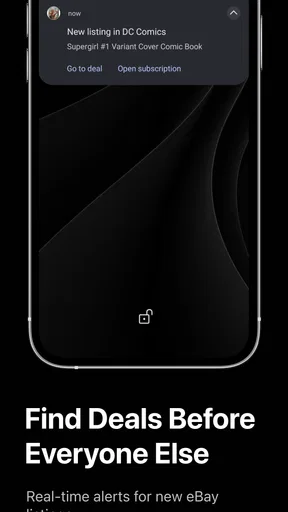
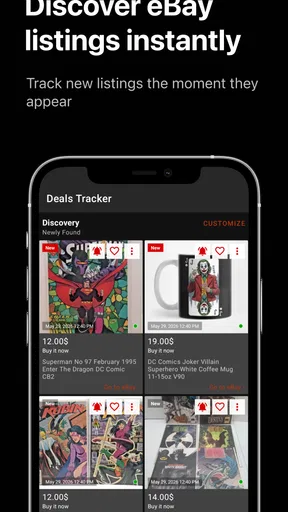
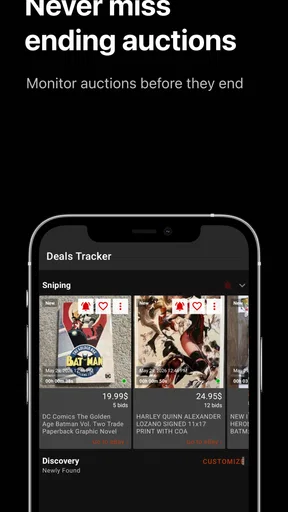
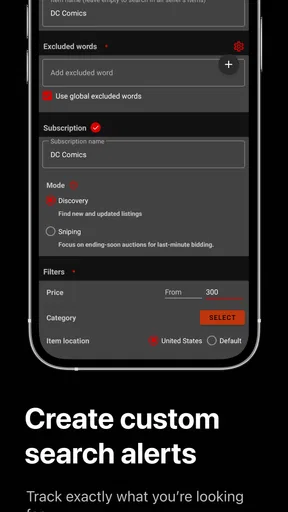
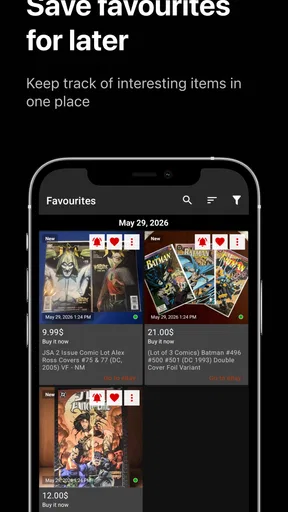
Our Review of Deals Tracker PRO: eBay Alerts
 Analysis by Appyee
I like shopping tools that solve one annoying problem instead of trying to become an entire marketplace. Deals Tracker PRO: eBay Alerts takes that focused approach: it is a shopping app built around finding better prices on eBay without making me repeat the same search every day. Its central value is simple, but useful. Rather than relying on memory or hoping to notice a newly listed bargain, I can use the app as a watchful assistant for products I already want.
That makes the app especially interesting for patient buyers. It is not designed to replace eBay, and it is not a general price-comparison service covering every retailer. The experience is more specific: I set up a search or alert, then let the app help surface opportunities that fit it. In my view, that narrower purpose is also its main strength. If you regularly search for collectibles, replacement parts, older electronics, hobby equipment, or anything else where prices vary widely between listings, this kind of monitoring can save time and reduce impulse buying.
Why the alert-based approach matters
The important capability here is not merely searching for an item. eBay already lets shoppers search manually. The useful difference is turning a repeated search into an ongoing routine. Once I know what I am looking for and what would count as a fair deal, an alert-focused tool gives that search a job to do in the background.
That changes the buying process in a small but meaningful way. Instead of opening eBay whenever I remember a product, I can decide in advance what matters: a particular model, a certain type of item, or a price range that feels reasonable. The app then becomes most valuable during the waiting period between wanting something and actually buying it. The real benefit is disciplined patience, not magic bargain hunting.
This distinction is worth keeping in mind. Deals Tracker PRO: eBay Alerts cannot make an overpriced listing fair, and an alert does not remove the need to inspect the listing itself. The app helps me notice possibilities; I still need to check the seller, condition, shipping, return terms, photos, and the exact item description on eBay before paying.
That makes it a particularly good fit for purchases where waiting is acceptable. If I need a charger today or want the fastest possible delivery, manually choosing a current listing may be more practical. If I am looking for a discontinued item and can wait for the right listing, monitoring becomes much more useful. The app’s value rises with the rarity, price variation, or non-urgent nature of the item.
What the app changes in an ordinary search
A normal marketplace search is usually a moment in time. I type a phrase, scan the results, and decide whether anything looks worthwhile. That works well for common products, but it is tiring when the results change frequently or when good listings appear unpredictably. Repeating the same process creates friction, and that friction often leads to one of two bad habits: buying too early or giving up before the right offer appears.
An alert workflow gives me a third option. I can define the search once, keep it active, and return when something relevant appears. This is especially helpful when I am comparing several possible versions of a product. For example, a buyer searching for an older camera may accept different colors, kits, or conditions, but only below a personal spending limit. Monitoring those possibilities is easier than trying to remember every variation during separate visits to eBay.
There is also a psychological advantage. When I search manually, I may feel pressure to choose from whatever is visible. An alert-based approach encourages me to judge the item against a plan I made earlier. That can make it easier to ignore listings that are merely available rather than genuinely good value.
Using it as a buying filter, not a buying decision
My best advice is to treat each alert as a prompt for investigation rather than an automatic recommendation. A notification or result may match the words in a search while still being unsuitable because of condition, accessories, location, shipping cost, or an incomplete description. The app can narrow the field, but it should not replace careful reading.
A practical workflow is to create a focused search first, then refine it after seeing the kind of results it produces. If the results are too broad, add identifying details. If they are too narrow, remove terms that describe optional features rather than the essential product. This trial-and-adjust process is one of the less obvious ways to get more from the app: the quality of the alert depends heavily on the quality of the search behind it.
I also find it useful to separate “must have” details from “nice to have” details. Putting every preference into one search can hide worthwhile listings. A better approach is to monitor the core item with a reasonable search, then inspect the results for variations. That keeps the alert from becoming so restrictive that it misses a good deal simply because a seller used different wording.
A realistic everyday scenario
Imagine I want a replacement part for an older appliance. Buying a new equivalent may be expensive, while used listings appear irregularly and may be described with several different terms. I could search eBay every evening, but that is easy to forget and difficult to sustain. With Deals Tracker PRO: eBay Alerts, I would set up a focused search around the part and let the app help me watch for new opportunities.
When a possible match appears, I would not buy immediately. I would compare the listing’s photographs with the part I own, check model compatibility, read the condition notes, and calculate the total cost after shipping. If the item is wrong, I have lost only a little time reviewing it. If it is right and fairly priced, the alert has done something genuinely useful: it brought an occasional opportunity to my attention before I would otherwise have noticed it.
The same pattern works for a used lens, a discontinued game accessory, a replacement remote, or a particular book edition. In each case, the app is most helpful because the product is not something I expect to find at the same price every day. It gives the search continuity without requiring me to perform the search manually each time.
Where the experience needs patience
The first trade-off is that alerts do not guarantee a bargain. A relevant result may arrive at an inconvenient time, sell quickly, or still cost more than I want to pay. The app improves awareness, but the marketplace remains competitive and unpredictable. I would not use it with the expectation that every notification represents a rare opportunity.
The second trade-off is alert quality. Broad searches may produce noise, while highly specific searches can miss listings that use unusual titles. This is not a flaw unique to this app, but it matters because the whole experience depends on finding the right balance. I would expect to spend some time adjusting searches rather than assuming the first setup will be perfect.
There is also a risk of notification fatigue. If I monitor too many loosely defined items, the app can become another source of interruptions instead of a helpful shopping assistant. I get better results by reserving alerts for products I would realistically buy and removing searches once the purchase is no longer relevant.
Another limitation is that the app focuses on eBay deals rather than giving me a broad view of every retailer. If my main goal is to compare eBay with local stores, specialist marketplaces, or major online shops, I would need another tool or a separate manual check. Deals Tracker PRO: eBay Alerts is more focused than a universal comparison service, and that focus will suit some shoppers far more than others.
The paid price also affects the decision. The app costs $3.99, so I would think about the kind of shopping I do before installing it. For someone who uses eBay occasionally for inexpensive purchases, the cost may not feel worthwhile. For someone trying to locate one difficult-to-find item or regularly monitoring products with large price differences, the fee can be easier to justify because the app’s usefulness comes from repeated monitoring over time.
How it compares with checking eBay yourself
The obvious alternative is simply using eBay’s own search experience whenever I remember. That option is better for quick purchases, browsing, and situations where I already know the exact listing I want. It also keeps the entire buying process in one place. However, manual checking depends on my consistency, and that is precisely where an alert tool earns its place.
Compared with a broad deal-finding app, this one has a clearer purpose. A general shopping app may show promotions across many stores, but it may not be as useful when I am waiting for one particular eBay item. Deals Tracker PRO: eBay Alerts makes more sense when the marketplace itself is central to the search and the timing of the listing matters.
There is a trade-off in that specialization. I should not expect it to tell me whether eBay is the cheapest place overall, nor should I assume that a lower listing price means a lower final cost. Shipping, condition, seller history, and included accessories can completely change the value. I use the app to discover candidates, then compare the complete offer with alternatives before deciding.
Small habits that make alerts more useful
I would begin with a short list of high-priority searches rather than adding every item on my wish list. This keeps the results meaningful and makes it easier to notice a genuinely attractive listing. After a few results, I would review which search terms are producing irrelevant items and adjust them. That simple maintenance step is more valuable than endlessly adding new alerts.
For products with several versions, I would avoid building one extremely complicated search immediately. Separate searches can make the results easier to understand when the differences matter, while a broader search can be useful for discovering unfamiliar wording used by sellers. The right choice depends on whether I am already an expert on the item or still learning how it is described.
I would also decide on my maximum total budget before an alert arrives. That means considering shipping and any missing accessories, not just the displayed item price. Having that limit ready protects me from treating an alert as a reason to spend rather than as information to evaluate.
Finally, I would remove completed or abandoned searches. A forgotten alert can keep sending results long after the original need has disappeared. Keeping the list current makes the app feel quieter and more intentional, which is important for a tool whose main purpose is to reduce repetitive shopping work.
Who benefits most from the focused workflow
The strongest audience is made up of patient eBay shoppers who already know what they want but do not need it immediately. Collectors, repair-minded buyers, hobbyists, and people searching for older or uncommon products can all benefit from having a persistent watch over changing listings. The app is also useful for anyone who tends to miss good offers because they forget to repeat a search.
It is less convincing for casual shoppers who make only occasional purchases, always need items quickly, or prefer buying new products from a single retailer. Those users may find the setup and ongoing monitoring more effort than the savings justify. I would also skip it if my main priority were comparing prices across many shopping sites rather than tracking eBay specifically.
MobileSoft4You has kept the product centered on a practical shopping problem, and that clarity is reflected in its position as an app rather than an overloaded marketplace. It has a 4.6 average from around 401 ratings, with over 50 thousand installs, which suggests that the focused idea has found a receptive audience. It is marked for Everyone, runs on Android 7.0 or later, and the current version is 2.54.0. The app first appeared on October 3, 2017, so it is not a brand-new experiment.
In my experience, the deciding question is not whether the app can find a deal on command. It cannot promise that. The better question is whether I would benefit from keeping a structured eye on eBay instead of repeatedly searching by hand. If the answer is yes, the one-time $3.99 cost is easier to understand. If I only browse when I need something immediately, the regular eBay experience may be enough.
My final view is favorable, with the right expectations. Deals Tracker PRO: eBay Alerts is a specialized tool for turning an occasional eBay search into a more deliberate buying process. Its strongest result is saving attention: I can define what I am watching, wait more patiently, and investigate promising listings when they appear. I recommend it most to buyers who value timing and persistence more than instant shopping. It is not a substitute for checking listing details, comparing total costs, or making a careful purchase decision, but for hard-to-find items and price-sensitive searches, that focused assistance can be genuinely worthwhile.
Verdict
Strengths of Deals Tracker PRO: eBay Alerts
- Tracks eBay listings and price changes in one place.
- Custom alerts help you react quickly to new matching items.
- Useful for monitoring rare, collectible, or hard-to-find products.
- Supports more focused searches than manually checking eBay.
- Can help compare listing prices before making a purchase.
Limitations of Deals Tracker PRO: eBay Alerts
- Alert timing may vary depending on notification and network settings.
- Requires careful keyword setup to avoid irrelevant listing matches.
- Third-party app availability may depend on eBay service changes.
- Frequent alerts can become distracting for popular search terms.
- You still need to review seller ratings, shipping, and listing details.
Similar Picks in This Category
View All
SHEIN-Shopping Online
Roadget Business PTE. LTD.4.8

Amazon Shopping
Amazon Mobile LLC4.4


Mercado Libre: Compras online
Mercado Libre4.8

Wish: Shop and Save
Wish US Holdings LLC4.7

Alibaba.com - B2B marketplace
Alibaba Mobile4.4
Frequently Asked Questions
What is Deals Tracker PRO: eBay Alerts and how does it work?
Deals Tracker PRO: eBay Alerts is designed to help eBay shoppers monitor listings and discover price opportunities without repeatedly searching the marketplace. After entering keywords, categories, preferred prices, or other search conditions, you can create alerts for matching items. The app then notifies you when relevant listings appear or when tracked products change, depending on the alert settings and available eBay data.
Can I use Deals Tracker PRO: eBay Alerts to track specific products or sellers?
Yes, the app is intended for tracking products, searches, and potentially seller-related listings through customized alerts. You can create separate monitoring rules for items you are actively looking for, such as collectibles, electronics, clothing, or replacement parts. The more precise your keywords and filters are, the more useful the results tend to be, although alert availability may depend on how eBay listings are indexed.
Does Deals Tracker PRO: eBay Alerts buy items automatically or place bids for me?
No, an alert app should not be confused with an automatic bidding or purchasing service. Deals Tracker PRO: eBay Alerts is primarily useful for notifying you about listings and changes so you can review them yourself. You normally need to open the relevant eBay listing, check the seller, shipping costs, return policy, auction conditions, and final price before deciding whether to bid or buy.
Are notifications from Deals Tracker PRO: eBay Alerts reliable and immediate?
Notifications can be helpful for finding new opportunities quickly, but they may not always arrive instantly. Delivery can be affected by your phone’s notification permissions, battery-saving settings, internet connection, background activity restrictions, and the way eBay data is made available. For important auctions, it is wise to check the app regularly and avoid relying on alerts as a guaranteed real-time bidding reminder.
Is Deals Tracker PRO: eBay Alerts free to download, and are there any limitations?
The app’s download availability, subscription model, and included features can vary by platform and region, so you should review its current store listing before installing it. Some versions may offer basic tracking while reserving advanced alerts, unlimited searches, or extra filters for a paid plan. Also check privacy information, account requirements, advertising, and cancellation terms before starting any trial or subscription.
